Skip to content
Home
About
Expertise
Menu Toggle
Digital Marketing Strategy
Website Design
Paid Ads & Media Advertising
Social Media Management
Sales Closing Service
Internal Training & Coaching
News & Insights
Work
Contact
About
Contact
Expertise
Menu Toggle
Digital Marketing Strategy
Internal Training & Coaching
Paid Ads & Media Advertising
Sales Closing Service
Social Media Management
Website Design
News & Insights
Support
Thank You
Webbey Digital Agency – Digital Marketing Agency in Malaysia and Asia
Work
Menu Toggle
BeQ
Daymore
DJ Yin Yin
Innoplace
QLT
Shapes
Tambatan Marin
Main Menu
About
Contact
Expertise
Menu Toggle
Digital Marketing Strategy
Internal Training & Coaching
Paid Ads & Media Advertising
Sales Closing Service
Social Media Management
Website Design
News & Insights
Support
Thank You
Webbey Digital Agency – Digital Marketing Agency in Malaysia and Asia
Work
Menu Toggle
BeQ
Daymore
DJ Yin Yin
Innoplace
QLT
Shapes
Tambatan Marin
Home
About
Expertise
Menu Toggle
Digital Marketing Strategy
Website Design
Paid Ads & Media Advertising
Social Media Management
Sales Closing Service
Internal Training & Coaching
News & Insights
Work
Contact
About
Contact
Expertise
Menu Toggle
Digital Marketing Strategy
Internal Training & Coaching
Paid Ads & Media Advertising
Sales Closing Service
Social Media Management
Website Design
News & Insights
Support
Thank You
Webbey Digital Agency – Digital Marketing Agency in Malaysia and Asia
Work
Menu Toggle
BeQ
Daymore
DJ Yin Yin
Innoplace
QLT
Shapes
Tambatan Marin
Main Menu
About
Contact
Expertise
Menu Toggle
Digital Marketing Strategy
Internal Training & Coaching
Paid Ads & Media Advertising
Sales Closing Service
Social Media Management
Website Design
News & Insights
Support
Thank You
Webbey Digital Agency – Digital Marketing Agency in Malaysia and Asia
Work
Menu Toggle
BeQ
Daymore
DJ Yin Yin
Innoplace
QLT
Shapes
Tambatan Marin
Support
Home
Documentation
cPanel
How To Register And Edit Webmail?
How To Register And Edit Webmail?
Table of contents
Create email account
Create email account
#
Navigate to the cPanel’s Email Accounts interface
(cPanel > Home > Email > Email Accounts)
.
Enter a new
email address
in the
Username
text box.
In the
Password
section, enter a secure password in the
Password
text box.
Click ‘
Create Account’
to create the account.
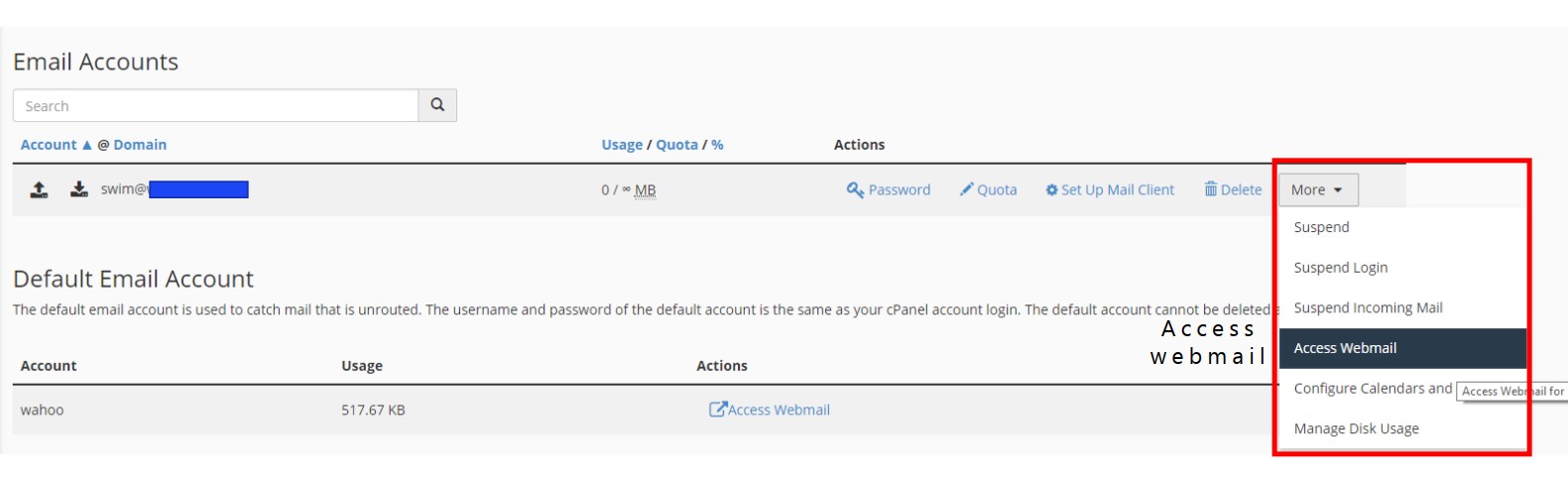
Configure the webemail.
Access the webemail.
What are your feelings
Share This Article :
How To Log In Your cPanel?
WordPress: How To Access Your WordPress Dashboard?